
Facebook is entering the world of location-based marketing, similar to Gowalla, FourSquare, and Yelp, with Facebook Places. Facebook Places was recently launched in the US and is being deployed world wide.
Location Based Marketing, including services such as Four Square and Facebook Places is a fairly new addition to the Internet Marketing toolkit and has enormous potential for businesses, in particular businesses such as restaurants, coffee shops, bars and other "social" businesses where the general public gather.
A service like FourSquare is a fun web and mobile application that allows registered users to connect with friends and update their location. Points are awarded for "checking in" at venues.
Facebook Places, similarly, will allow users to let others know where they are. This video that was published on the Social Media Examiner page explains what Facebook Places is all about.
Friday, September 10, 2010


Wednesday, September 8, 2010
Get Organized this Fall
As we leave summer behind, we get into work and school mode with being organized on of the top items on the list. Here are a few tips to make it easier...
Get it out of your head and onto paper.
Many competing ideas in your head will drive you crazy. Paper is tangible, so get it out of your head and onto paper. From there you can underline, colour code, connect certain items, stick it on the wall or share.
Set up space in the clouds to store information.
Upload documents to space on the Internet where they are accessible and secure such as Microsoft's Skydrive, Apple’s Mobileme iDisk, Dropbox. Store your client contact information online in Google Contacts (need a Gmail account or in Apple's Mobileme.)
Flag your to-do items for follow up.
Often emails contain a reminder to do something or to follow up on something. In Microsoft Outlook, use the Flag feature to flag those emails for follow up or in Google Mail, use the Star feature.
Online collaboration saves time.
Use Google Docs to take minutes in meetings. Save, format and share with others. It saves paper and time. Zoho is a service that rivals what Google has to offer and Zoho Docs is worth looking into.
Search, not File.
As a time saver, use a mail program that lets you search for information in stead of organizing information into folders. Google Apps is a must for your small to medium sized business.
Keep track with an online calendar.
Google Calendar lets you store multiple calendars in one, it syncs with other calendars (Microsoft Outlook, iCal, iPhone) and it can send you a reminder by SMS or email. Your Google Calendar can also easily be shared with others. And above all, you can access it from wherever you are.
Get an iReader.
Carry multiple books with you, save paper, add notes and bookmarks electronically and see what other readers highlighted in a book. My favourite is the Kindle app on my iPad. iBooks on the iPad is equally as nice. The Kindle app will also let you read books on your PC or Mac.
So you have any time saving organizing tips to share? Let us know.
Get it out of your head and onto paper.
Many competing ideas in your head will drive you crazy. Paper is tangible, so get it out of your head and onto paper. From there you can underline, colour code, connect certain items, stick it on the wall or share.
Set up space in the clouds to store information.
Upload documents to space on the Internet where they are accessible and secure such as Microsoft's Skydrive, Apple’s Mobileme iDisk, Dropbox. Store your client contact information online in Google Contacts (need a Gmail account or in Apple's Mobileme.)
Flag your to-do items for follow up.
Often emails contain a reminder to do something or to follow up on something. In Microsoft Outlook, use the Flag feature to flag those emails for follow up or in Google Mail, use the Star feature.
Online collaboration saves time.
Use Google Docs to take minutes in meetings. Save, format and share with others. It saves paper and time. Zoho is a service that rivals what Google has to offer and Zoho Docs is worth looking into.
Search, not File.
As a time saver, use a mail program that lets you search for information in stead of organizing information into folders. Google Apps is a must for your small to medium sized business.
Keep track with an online calendar.
Google Calendar lets you store multiple calendars in one, it syncs with other calendars (Microsoft Outlook, iCal, iPhone) and it can send you a reminder by SMS or email. Your Google Calendar can also easily be shared with others. And above all, you can access it from wherever you are.
Get an iReader.
Carry multiple books with you, save paper, add notes and bookmarks electronically and see what other readers highlighted in a book. My favourite is the Kindle app on my iPad. iBooks on the iPad is equally as nice. The Kindle app will also let you read books on your PC or Mac.
So you have any time saving organizing tips to share? Let us know.
Tuesday, September 7, 2010
13 Things to Do at the End of the Tourism Season
For Tourism Operators:
Labour Day Weekend in North America signals the end of summer for many and with it, the end of family vacations, visits and travel. June, July and August is peak tourism season in the northern hemisphere and tourism operators work like bees to create a good time, comfort, memories and great experiences.
With the end of this busy season in sight, the list of work continues as things are getting wrapped up. Here are a few marketing ideas to consider:
Labour Day Weekend in North America signals the end of summer for many and with it, the end of family vacations, visits and travel. June, July and August is peak tourism season in the northern hemisphere and tourism operators work like bees to create a good time, comfort, memories and great experiences.
With the end of this busy season in sight, the list of work continues as things are getting wrapped up. Here are a few marketing ideas to consider:
Manage Contact Information
- Organize your list of names and addresses of guests and customers that you collected during this past season.
- Segment your contact lists (couples, families, boomers... whatever is suitable for your business).
- Capture the contact information in a contact management system (Google Contacts, Batchbook, Zoho CRM, Microsoft Outlook Address Book or an Excel Spreadsheet) or in an email program (Constant Contact, MailChimp or StreamSend)
- Send a follow-up e-newsletter with photos from the summer and a bit of news to encourage happy memories to linger a bit longer. If it makes sense in your business, create different version of your e-newsletter for different segments of your list, i.e. outdoor enthusiasts; theatre-lovers; families, honeymooners etc.
- Send a sincere thank-you note or card - make sure your business gets a fond spot in the email box, on the fridge, album or notice board.
- Invite guests to become a part of your social community on Facebook, Twitter, Flickr or YouTube. Continue conversations with your guests on these social channels.
- Search for photos, tweets, blogs or videos that were posted by guests or visitors to your region, establishment or town and comment, link, "friend" or "like" the content.
- Add a Facebook "like" button to your website as well as social media buttons to your social channels.
- Update your website with photographs and images for the new season to encourage a few more weeks of travel during the shoulder season.
- Post photos to your website and invite your guests to provide their favourite pictures for your site.
- Plan travel packages with other tourism operators in your area or a location along the route for the new season.
- Update testimonials on your site and invite your list to submit testimonials to sites like Canada Select and Tripadvisor.
- Plan for your own professional development and register to attend one of our workshops! You may learn a few new things but also network with like-minded people.
Tuesday, May 18, 2010
Where do I start with my website?
"Where to start planning a new website?" is a question I am asked quite often. This is a broad question and many resources already exist that help getting to the right answers.
Here is a link to a comprehensive blog post on the topic "Preparing to work with a designer: What to bring to the plate when you are planning your website?" It is well worth the read.
Or perhaps you prefer to get advice from a Rapper - see this SEO Rapper tell the story of web development.
Digital Daisy's blog also has a few articles that answers this same question:
- The ten most commonly made mistakes in online marketing.
- The web development process.
- What to ask before you hire a web developer.
Planning
Like all planned journeys, the web development process starts with a destination in mind. There are two questions that are important before embarking on the web development journey:
1. Why the heck am I doing this?
2. What do I want from my site?
Elements
A website has 4 basic elements that require planning:
- Design
- Content
- Navigation and
- Functionality
Developing content will most likely be your responsibility and the earlier in the process you get this done, the easier it will be on the rest of the process. A small business owner knows best who he/she is talking to, and what to say.
Navigation
Planning a site's navigation is like planning a journey with its main route, detours and excursions. Think of how content in the site has to connect to each other. Two sites I like for planning, are GoMockingbird (great for mocking up a page that shows where all the elements of the page should be) and Slickplan (for creating flow charts). Microsoft Excel is useful for this as well.
Functionality
The functionality you'd like your site to have depends on the site's purpose and could be an events calendar, a form, a photo gallery, social media widgets, a shopping cart or more. One piece of functionality that is almost a given nowadays is having a content management system (CMS) for your site. This allows you as the owner to add, delete and edit pages on your site in a user-friendly way.
Popular CMS's are Django, Drupal, Joomla and WordPress. Even Blogger which was originally a blogging site, now allows for easy addition of pages to the blog page. In the list of questions to ask a Web Developer - ask to have a CMS and ask to see an example of how it works.
Other benefits of a CMS: CMS's like the above are used by many developers across the globe who collaborate to write functionality for sites (also called plug-ins). These are often available for download by other developers (free). This means that you are able to "plug in" new functionality into your site as you need it at low or now cost very quickly, like a registration form or a calendar.
Content
The most important point about content is that is should be written for the user and from the user's perspective. What is your reader looking for?
The Hidden Bits
- Ensure that you get the domain name of your choice, that it is registered in the name of your company, using an email address/es that will always reach you.
- Make note of your registrar, its web address and passwords to your domain registration account.
- Make sure upfront that the web host you select can host the files your developer will create.
- Make a note of your web host's web url and password to your account.
- Meta content (page titles, tags, key words, alt-tags) are not always visible on first glance at the site. Make sure that they are there, that they are unique for each page and that they are search engine optimized.
- Plan for links: Link the content of your pages together. Hyperlinks is another form of site navigation and search engines like it. Also plan for other sites you want to link to or want to request a link from - good for users, good for search engines!
- Add analytics to your site - Google Analytics is a popular choice and ask your web developer to set it up on your site and to show you how to use it.
- Plan for Social Media - which of your social media would you like to integrate on your site and where? Widgets are available from most social media sites (Linkedin, Facebook, Flickr, Twitter and more). This can help to keep your site fresh and interesting. Also plan for sharing options to add to the page such as RSS feeds, Email This, Tweet This, Like, comments and ratings options. One quick way to add this is by adding something like AddThis.
Wednesday, May 12, 2010
What are Canadians Doing Online?
Stats Canada published the following information on May 10 2010 with regard to how Canadians use the Internet at home.
Interesting that a popular use, Travel Planning, remained at the same level as two years prior, while the use for health & medical research; watching TV & Video online increased significantly as did contributing to social media activities (blogs etc.). Internet telephony increased - a trend worth watching.
The largest relative increase (2007 - 2009) in Internet usage was in Newfoundland and Labrador and New Brunswick respectively (both up by 15%).
| 2007 | 2009 | |
|---|---|---|
| % | ||
| 92 | 93 | |
| General browsing for fun or leisure | 76 | 78 |
| Obtain weather or road conditions | 70 | 75 |
| Research other matters (family history, parenting) | 70 | 73 |
| Search for medical or health related information | 59 | 70 |
| View news or sports | 64 | 68 |
| Electronic banking or bill payment | 63 | 67 |
| Travel information or making travel arrangements | 66 | 66 |
| Window shopping | 60 | 65 |
| Search for information about governments | 51 | 57 |
| Education, training or school work | 50 | 50 |
| Research community events | 44 | 50 |
| Order personal goods or services | 45 | 50 |
| Obtain or save music (free or paid downloads) | 45 | 47 |
| Use an instant messenger | 50 | 45 |
| Play games | 39 | 42 |
| Obtain or save software (free or paid downloads) | 33 | 35 |
| Job search | 32 | 35 |
| Listen to the radio over the Internet | 28 | 32 |
| Download or watch TV or a movie over the Internet | 20 | 31 |
| Research investments | 25 | 27 |
| Communicate with governments | 26 | 27 |
| Contribute content (blogs, photos, discussion groups) | 20 | 27 |
| Make telephone calls | 9 | 14 |
| Sell goods or services (auction sites) | 9 | 13 |
Saturday, May 8, 2010
Haul Videos more Powerful than Like buttons?
ABC News recently reported on a new trend on YouTube called Haul Videos. Teenage girls, predominantly, use one of their favourite things, their web cam, to video blog (vlog) about one of their other favourite things: shopping.
Girls show off their purchases online, become YouTube stars and even attract sponsorship. The power of these "consumer reviews" by a group with tremendous retail purchasing power and influence is undeniable.
ABC News reported there to be about 110,000 haul videos currently on YouTube. Originally displaying predominantly cosmetic purchases, this has expanded to include anything from bags to shoes to clothing for their favourite pet - commenting on the quality or the purchase as they vlog along.
Even more powerful than peer reviews and like buttons, it is anticipated that marketers will be hot on the trail of this technique, canvassing user-promoters that are happy to promote their products - a second-cousin technique to mystery shopping.

Wednesday, May 5, 2010
8 Tips: Listening as a Marketing Strategy
What a scramble to get on the social media bus - we tweet, update statuses, blog, comment and create. However, it is generally accepted that listening is the most effective social media marketing strategy. Here are some ideas for keeping your ear to the ground...
1. Eavesdropping on Twitter - Twitter Search

Twitter Search is ideal for finding out what is being said. No Twitter account is needed - just enter the search term in the search window on twitter.com to find out what others are saying about your topic.
2. Follow #Hash Tags & Monitor Search Terms

The so-called “hash-tag” that prefaces certain terms clusters conversations that include this tag on Twitter as belonging together. At conferences hash-tagged phrases often spring up spontaneously (such as #TedX) to cluster anything being said about this event.
A recent fun example was #doyletweets and #doylequotes, used to tweet about the Republic of Doyle. Doyle fans would tweet comments out about the episode while watching - a search of #doyletweets lets you in on the conversation.
Find a community that talks about topics you are interested in. Twitter Search will point you in the right direction. If you use a tool such as TweetDeck, set up columns for your favourite search terms or hash tags. One of mine is the town of Twillingate - every time there is a Tweet about "Twillingate", it is picked up in my "Search: Twillingate" column. This morning I was saved a speeding fine by a kind tweeter alerting me to a speed trap along the way #Twillingate. Catch negative comments about your business quickly and respond, or pick up on a business opportunity and follow the lead.
Another technique for listening in on my favourite topics, is to search for authors of my favourite business books on Twitter. A few of my favourite Tweeps are authors @shelisrael (Twitterville), @tompeters (Thriving on Chaos), @anthonyrobbins (Unlimited Power) and @charleneli (Groundswell). Add a comment to share yours...
4. Plug into the Local Community

In our local tourism industry you may want to eavesdrop on what @nltweets (Dpt. of Tourism), @centralNL (Central Destination Marketing Organization) or @DestinationSJ (Destination St. John’s) are saying. Visit their pages (twitter.com/nltweets etc.) if you do not have a Twitter account, or follow them once you are logged in.
Follow @ryansnoddon to get the local weather report even before the weather office does! Each community has its tweet elite.
5. Follow the buzz on Facebook, YouTube or Linkedin
You have a Facebook page for your business? Great! So, what is more important… what you are saying or what “they” are posting? Comments and contributions from others become gold in your research. Why spend millions on research if you could merely eavesdrop on the conversation in your community. Here are some ways to engage your audience...

Have you ever searched for topics of interest on Facebook or Linkedin? Pages and groups reveal much through the conversation that is happening. Outsider comments on your own blog posts or photos are equally useful. While creating content is a good start, engagement and conversation are invaluable. It takes good fuel to start a fire - ask open-ended questions or throw out a provocative statement.
6. Get Google Alerts

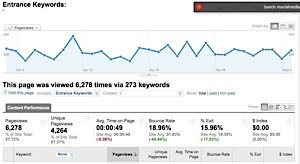
A place with much hidden treasure is often overlooked. If a web site has stats such as Google Analytics, you can most likely see from those stats, which words were typed into search engines to bring them to your site. This provides an indication of what potential customers are looking for.
8. Listening to the gurus
Even though I facilitate online marketing workshops and develop strategies for clients, I never fail to learn something new when attending someone else’s workshops. Listening to others in your field of business – a workshop, a conference, a mastermind group or simply a phone call can provide great market research. "Two ears, one yapper" someone recently tweeted... for good reason.
Subscribe to:
Posts (Atom)

 Posts
Posts


